Learning Bridgetown, Part 2
You can start a web application with one file (like config.ru for Roda) and build from there. If instead you use a framework like Bridgetown (or Sinatra, Rails, Cuba, etc.), you will be provided with a “scaffold” of initial files and folders, setting up a standard organization for your project. This is very useful, but can also confuse beginning developers, as it mixes the various building blocks of the framework in a manner that is conventional and convenient if you know what each part is for.
Some of this information comes from general programming knowledge (about Ruby, JavaScript, etc.), something that everyone possesses in different amounts at different times. Other Bridgetown specific information can be found in the official documentation. Yet when I first started with Bridgetown, I wished I could have found a quick summary of the building blocks and scaffold that I was beginning to work with.
This is my attempt at making one.
The building blocks
Backend / Core:
- Ruby — The primary programming language that powers Bridgetown’s core functionality, plugins, and templating.
- Roda — A lightweight Ruby web framework used for the server-side routing and API endpoints. Handles dynamic server-side rendering (SSR) when needed.
Templating:
- Liquid — A templating language.
- ERB — Ruby’s built-in templating system, available as an alternative to Liquid.
- Serbea — Bridgetown’s own templating syntax that combines ERB with Liquid-like filters.
Frontend Bundling:
- esbuild — A JavaScript bundler that compiles and bundles CSS and JavaScript files for the browser.
- PostCSS — A CSS processor that enables modern/upcoming CSS features and runs plugins like autoprefixer.
- Sass — An optional CSS preprocessor available as an alternative to PostCSS.
Package Management:
- Bundler — Manages Ruby gem dependencies (via Gemfile).
- npm — Manages JavaScript package dependencies (via package.json).
Content:
- Markdown — The primary format for writing content (processed by Kramdown by default).
- YAML — Used for front matter, data files, and configuration.
The scaffold
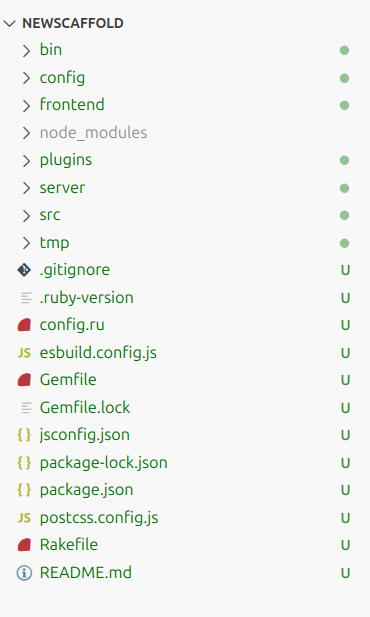
When you create a new project with the bridgetown new command, this initial scaffold of files and folders is provided. Here is a short description of what each does or contains. (Hint: to start a simple blog, for instance, you’ll only need to add content in the src folder.)
Folders:
- bin — Contains executable scripts for running Bridgetown commands (like
bin/bridgetown build,bin/bridgetown start, etc.). Using these binstubs ensures you’re using the correct version of Bridgetown as specified in your Gemfile. - config — Stores frontend and server default configurations, including
initializers.rbfor Ruby-based site configuration. - frontend — Contains your CSS and JavaScript source files for esbuild to process. Includes subdirectories for
javascript/andstyles/. - node_modules — Contains all installed npm packages and their dependencies.
- plugins — Where you can write custom Ruby plugins to extend Bridgetown’s functionality.
- server — Where you can optionally add API routes using Roda for server-side functionality.
- src — The main source directory containing your resources and design templates, including
_components,_data,_layouts,_posts, and other content.
Files:
- .gitignore — A list of files to be ignored by git.
- .ruby-version — The version of Ruby used for this project.
- config.ru — Configuration for a Rack-based (in this case, Roda) web server interface. Puma uses this to boot up the web server.
- esbuild.config.js — Configuration file for esbuild, the frontend JavaScript bundler that processes your CSS and JS files.
- Gemfile — A list of all Ruby dependencies.
- Gemfile.lock — A locked list of all Ruby dependencies and their exact versions, as installed.
- jsconfig.json — Configures JavaScript language features for code editors (like VS Code), specifying the project root and compiler options for better IntelliSense.
- package-lock.json — A locked list of all npm dependencies and their exact versions, as installed.
- package.json — A list of all npm (JavaScript) dependencies and build scripts.
- postcss.config.js — Configuration file for PostCSS, which processes CSS with plugins for features like autoprefixing and modern CSS syntax.
- Rakefile — Defines Rake tasks for automating common operations like building and deploying the site.
- README.md — A helpful starter document.
The src folder
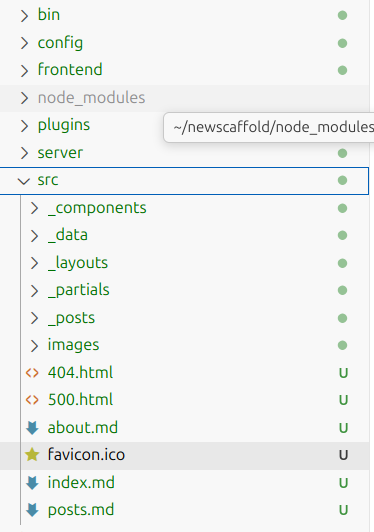
As noted above, a beginning developer just starting a new site or blog with Bridgetown needs only concern oneself with the src folder, where the content lives. Yet opening this folder can also be disconcerting, initially. Here is a quick description (Hint: initially, you will want to modify the site_metadata.yml file in the data folder, and add your blog posts in the posts folder. For other types of content, you will need to look in more details at “collections”.):
Folders:
- _components — Reusable view components that can include Ruby classes, templates (ERB, Liquid, Serbea), and sidecar CSS/JS files. Components encapsulate markup, styling, and behavior. Accessed via
render ComponentName.new. - _data — Data files (YAML, JSON, CSV, TSV, or Ruby
.rbfiles) that provide centralized, reusable data accessible across your site viasite.data. Includessite_metadata.ymlfor site-wide settings. - _layouts — Page layout templates that wrap your content. Typically includes a
defaultlayout and specialized layouts (likepost) that can inherit from others. Accessed via thelayoutfront matter key. - _partials — Reusable template fragments (like headers, footers, navigation) that can be included in layouts and other templates via
render "partial_name". Similar to Rails partials. - _posts — Blog posts, typically Markdown files with a date-prefixed filename format (
YYYY-MM-DD-title.md). Part of the built-inpostscollection. - images — Static image files (SVGs, PNGs, JPGs, etc.) that get copied to the output folder. Referenced via relative URLs like
/images/logo.svg.
Files:
- index.md — The homepage of your site.
- 404.html — Custom “page not found” error page.
- 500.html — Custom “internal server error” error page.
- Other pages (e.g.,
about.md, posts.md) — Standalone pages that become part of the built-inpagescollection. Their URL typically matches their file path. - favicon.ico — Custom favicon (a small icon file that represents your website).
Conclusion
I hope that this helps you get started. Eventually, you will have to read more and more of the Bridgetown documentation (I am not finished with it yet!) In the meantime, please feel free to reach out if you find anything wrong or unclear in the above primer.